Deployer PHP-CLI
CI/CD Deployment tool written in PHP supported for popular frameworks, (*1)

 , (*2)
FEATURES
-
Deploy to multiple servers by projects/groups, (*3)
-
Yii2, Laravel, Codeigniter3 Frameworks support, (*4)
-
Pipeline support for Git, Composer, test and customized tasks, (*5)
-
CI/CD automation solution, (*6)
Helping developers to deploy codes from local instance to remote instances., (*7)
OUTLINE
DEMONSTRATION
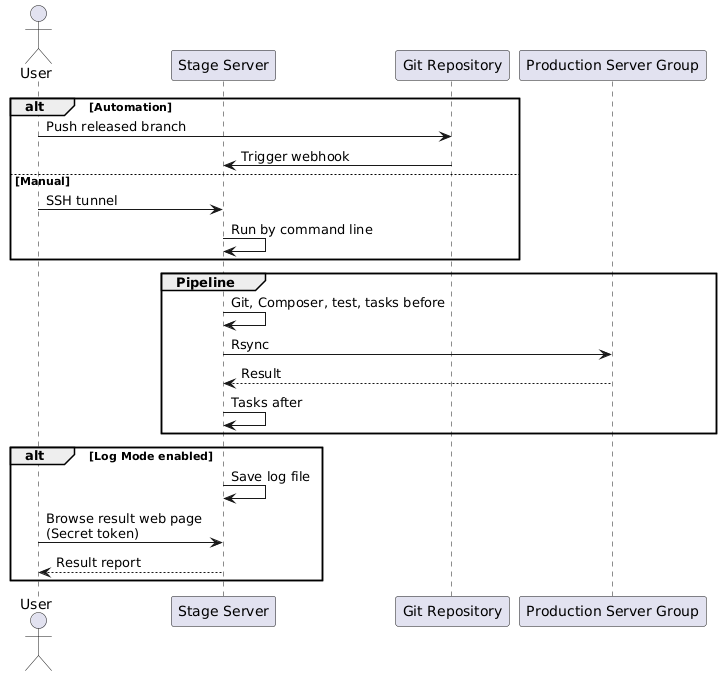 , (*8)
Command Line
Deploy local project to remote servers by just executing the deployer in command after installation:, (*9)
$ deployer
Alternatively, you could call the original bootstrap: $ ./deployer, $ php ./deployer, (*10)
The interactive result could like be:, (*11)
$ deployer

Your available projects in configuration:
  [0] your.project.com
  [1] second.project.com
  [2] other.site.com

  Please select a project [number or project, Ctrl+C to quit]:0

Selected Project: your.project.com
Successful Excuted Task: Git
Successful Excuted Task: Composer
Successful Excuted Task: Composer
Successful Excuted Task: Test UnitTest
Successful Excuted Task: Commands before: Minify assets
Successful Excuted Task: Deploy to 127.0.0.11
Successful Excuted Task: Deploy to 127.0.0.12
Successful Excuted Task: Deploy
Successful Excuted Task: Commands after: Email notification
Or you could run by non-interactive mode with the same purpose:, (*12)
$ deployer --project="your.project.com"
REQUIREMENTS
This library requires the following:, (*13)
INSTALLATION
Composer Installation
Using Composer by sudoer or root to install is the easiest way with auto-installer:, (*14)
composer create-project --prefer-dist yidas/deployer-php-cli
Wget Installation
You could see Release for picking up the package with version, for example:, (*15)
$ wget https://github.com/yidas/deployer-php-cli/archive/master.tar.gz -O deployer-php-cli.tar.gz
After download, uncompress the package:, (*16)
$ tar -zxvf deployer-php-cli.tar.gz
In addition, you can rename the unzipped folder by mkdir deployer-php-cli && tar -zxvf deployer-php-cli.tar.gz --strip-components 1 -C deployer-php-cli, (*17)
Make Command
To make a command for deployer, if the package folder is deployer-php-cli then create a symbol by following command:, (*18)
$ sudo chmod +x $(pwd -L)/deployer-php-cli/deployer
$ sudo ln -s $(pwd -L)/deployer-php-cli/deployer /usr/bin/deployer
Startup
After installation, you could start to set up the config.inc.php for deployer, and enjoy to use:, (*19)
$ deployer
Upgrade
To upgrade, you could re-install the deployer and copy the old config.inc.php to the new one, for example:, (*20)
$ cp ./deployer-php-cli/config.inc.php ./
$ rm -r deployer-php-cli
$ composer create-project --prefer-dist yidas/deployer-php-cli
$ mv ./config.inc.php ./deployer-php-cli
CONFIGURATION
Project Setting:
You need to set up the projects configuration such as servers, source and destination in config.inc.php file:, (*21)
<?php

return [
    // This project config processes deployment only for simple usage
    'default' => [
        'servers' => [
            '127.0.0.1',
        ],
        'source' => '/home/user/project',
        'destination' => '/var/www/html/prod/',
    ],
];
You could refer config.inc.php file as an example.., (*22)
Config Options:
Configuration provides many features' setting, you could customize and pick up the setting you need., (*23)
| Key |
Type |
Description |
| servers |
array |
Distant server host list |
| user |
array\ |
string|Local/Remote server user, auto detect current user if empty |
| source |
string |
Local directory for deploy, use / as end means *
|
| destination |
string |
Remote path for synchronism |
| exclude |
array |
Excluded files based on sourceFile path |
| verbose |
bool |
Enable verbose with more infomation or not |
Git
To use Git into deploy task, you need to init or clone Git to the source directory at the first time:, (*24)
$ git clone git@gitlab.com:username/project-to-deploy.git sourceDir
| Key |
Type |
Description |
| enabled |
bool |
Enable git or not |
| checkout |
bool |
Execute git checkout -- . before git pull |
| branch |
string |
Branch name for git pull, pull default branch if empty |
| submodule |
bool |
Git submodule enabled |
Composer
To use Composer into deploy task, make sure that there are composer files in the source directory., (*25)
| Key |
Type |
Description |
| enabled |
bool |
Enable Composer or not |
| path |
string |
Composer executing relative path which supports multiple array paths |
| command |
string |
Update command likes composer update
|
Test
To use Test into deploy task, make sure that there are test configuration in the source directory., (*26)
| Key |
Type |
Description |
| enabled |
bool |
Enable Test or not |
| name |
string |
The test name for display |
| type |
string |
Test type, support phpunit. |
| command |
string |
The test bootstrap command supported relative filepath such as ./vendor/bin/phpunit
|
| configuration |
string |
The test configuration file supported relative filepath such as ./phpunit.xml
|
Tests
For multiple test tasks, using array to declare each test options:, (*27)
return [
    'default' => [
        'tests' => [
            [
                'name' => 'Test Task 1',
                // ...
            ],
            [
                'name' => 'Test Task 2',
                // ...
            ],
        ],
        // ...
Rsync
| Key |
Type |
Description |
| enabled |
bool |
Enable rsync or not |
| params |
string |
Addition params of rsync command |
| timeout |
int |
Timeout seconds of each rsync connections |
| sleepSeconds |
int |
Seconds waiting of each rsync connections |
| identityFile |
string |
Identity file path for appling rsync |
Commands
Commands provides you to customize deploy tasks with many trigger hooks., (*28)
| Key |
Type |
Description |
| init |
array |
Addition commands triggered at initialization |
| before |
array |
Addition commands triggered before deploying |
| after |
array |
Addition commands triggered after deploying |
Example
- Copy
project directory form /var/www/html/ to destination under /var/www/html/test/:
'source' => '/var/www/html/project',
'destination' => '/var/www/html/test/',
- Copy all files (
*) form /var/www/html/project/ to destination under /var/www/html/test/:
'source' => '/var/www/html/project/',
'destination' => '/var/www/html/test/',
USAGE
Usage:
  deployer [options] [arguments]
  ./deployer [options] [arguments]

Options:
  -h, --help            Display this help message
      --version         Show the current version of the application
  -p, --project         Project key by configuration for deployment
      --config          Show the seleted project configuration
      --configuration
      --skip-git        Force to skip Git process
      --skip-composer   Force to skip Composer process
      --git-reset       Git reset to given commit with --hard option
  -v, --verbose         Increase the verbosity of messages
Interactive Project Select
$ deployer

Your available projects in configuration:
  [0] default
  [1] your.project.com

  Please select a project [number or project, Ctrl+C to quit]:your.project.com

Selected Project: your.project.com
Successful Excuted Task: Git
Successful Excuted Task: Composer
Successful Excuted Task: Deploy to 127.0.0.11
Successful Excuted Task: Deploy
Non-Interactive Project Select
$ deployer --project="your.project.com"
Skip Flows
You could force to skip flows such as Git and Composer even when you enable then in config., (*29)
$ deployer --project="default" --skip-git --skip-composer
Revert & Reset back
You could reset git to specified commit by using --git-reset option when you get trouble after newest release., (*30)
$ deployer --project="default" --git-reset="79616d"
This option is same as executing git reset --hard 79616d in source project., (*31)
IMPLEMENTATION
Assuming project1 is the developing project which you want to deploy., (*32)
Developers must has their own site to develop, for example:, (*33)
# Dev host
/var/www/html/dev/nick/project1
/var/www/html/dev/eric/project1
In general, you would has stage project1 which the files are same as production:, (*34)
# Dev/Stage host
/var/www/html/project1
The purpose is that production files need to be synchronous from stage:, (*35)
# Production host
/var/www/html/project1
This tool regard stage project as source, which means production refers to destination, so the config file could like:, (*36)
return [
    'project1' => [
        ...
        'source' => '/var/www/html/project1',
        'destination' => '/var/www/html/',
        ...
After running this tool to deploy project1, the stage project's files would execute processes likes git pull then synchronise to production., (*37)
Permissions Handling
1. Local and Remote Users
You could create a user on local for runing Deployer with umask 002. It will run process by the local user you set even you run Deployer by root:, (*38)
return [
    'project1' => [
         'user' => [
            'local' => 'deployer',
            'remote' => 'deployer',
        ],
        ...
2. Application File Permissions
Deployer uses rsync to deploy local source project to remote without --no-perms, which means that the source files' permission would keep on remote, but the files' owner would re-generate by remote user including root with --no-owner --no-group., (*39)
On the remote user, you could set the user's default groud ID to www-data in /etc/passwd, which the local user generates 664/775 mod files to deploy for remote www-data access., (*40)
For local user, umask 002 could be set in ~/.bashrc or global. Note that the permission need to apply for source files such as init from Git clone., (*41)
CI/CD
Webhook
Deployer provides webhook feature for triggering project deployment by any webhook service such as Gitlab., (*42)
To use webhook, you need add webhook setting into the projects you needed in config.inc.php:, (*43)
return [
    'project' => [
        // ...
        'webhook' => [
            'enabled' => true,
            'provider' => 'gitlab',
            'project' => 'yidas/deployer-php-cli',
            'token' => 'da39a3ee5e6b4b0d3255bfef95601890afd80709',
            'branch' => 'release',
            'log' => '/tmp/deployer-webhook-project.log'
        ],
    ],
];
| Key |
Type |
Description |
| enabled |
bool |
Enable Webhook or not |
| provider |
string |
Webhook provider such as gitlab
|
| project |
string |
Provider's project name likes username/project
|
| token |
string |
Webhook secret token |
| branch |
string |
Listening branch for push event |
| log |
bool\ |
string|Enabled log and specify the log file |
PHP Web Setting
Deployer need a user to excute deployment, and the user is usually not the PHP web user., (*44)
For PHP-FPM, you could add a new PHP pool socket with the current user setting for the webhook site, for example /etc/php/fpm/pool.d/deployer.conf:, (*45)
[deployer]

user = deployer
group = www-data

listen = /run/php/php7.0-fpm_deployer.sock
Then give the new socket to the webhook server setting, for Nginx eaxmple /etc/nginx/site-enabled/webhook:, (*46)
server_name webhook.your.com;
root /srv/deployer/deployer-php-cli/webhook;

location ~ \.php$ {
    include snippets/fastcgi-php.conf;
    fastcgi_param SCRIPT_FILENAME $request_filename;
    fastcgi_pass unix:/run/php/php7.0-fpm_deployer.sock;
}
After a successful webhook, Deployer would prepare to process while responding the status and the result url for checking the deployment result., (*47)
Note: The PATH environment variable between Shell and PHP should be set to the same to prevent any unexpected problems., (*48)
Gitlab
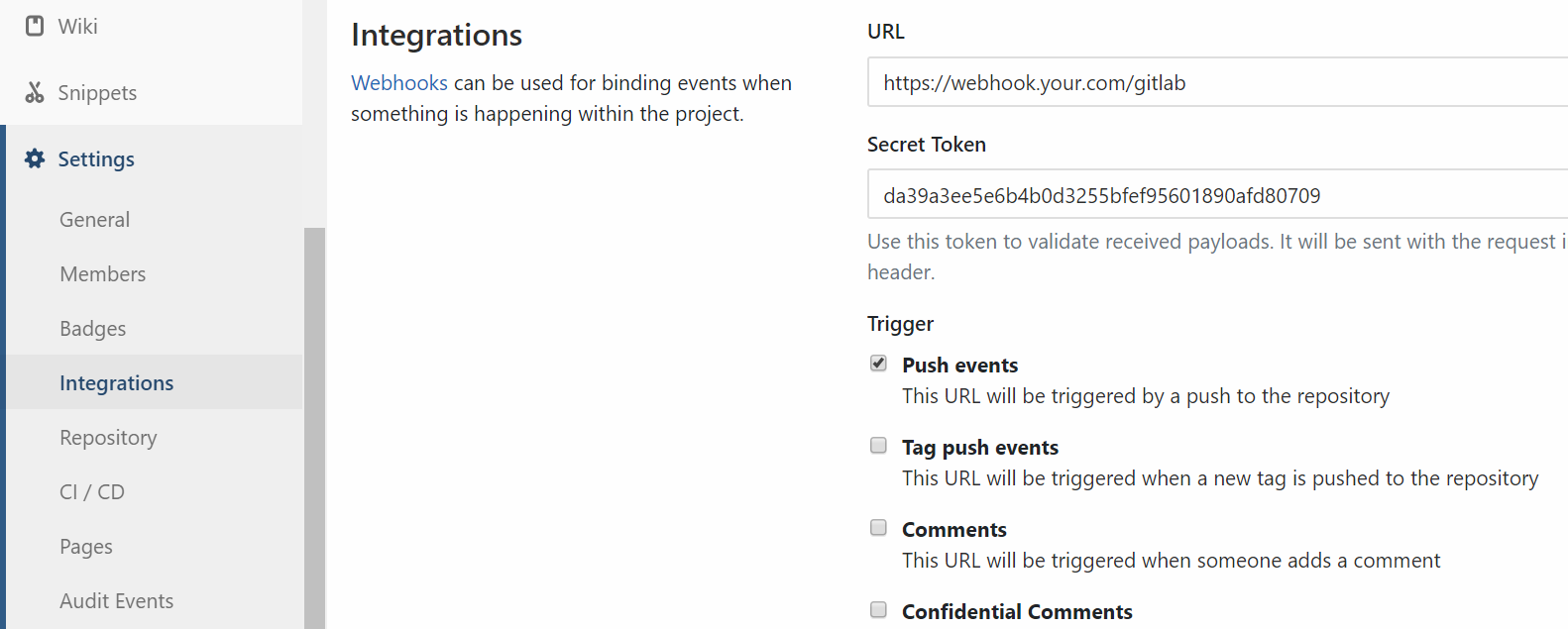
According to above Nginx website setting, the webhook URL could be https://webhook.your.com/gitlab. After setting config.inc.php and setting up scecret token, you could give a push event to go!, (*49)
 , (*50)
Note: Default setting is listen release branch's push event to trigger., (*51)
To browse the web page for result log report, enter the same webhook URL with log and token parameters to access.
For example: https://webhook.your.com/gitlab?log={project-name}&token={project-token}, (*52)
ADDITIONS
Rsync without Password:
You can put your local user's SSH public key to destination server user for authorization., (*53)
.ssh/id_rsa.pub >> .ssh/authorized_keys
Save Binary Encode File:
While excuting script, if you get the error like Exception: Zend Extension ./deployer does not exist, you may save the script file with binary encode, which could done by using vim:, (*54)
:set ff=unix
Yii2 Deployment
For yii2-app-advanced, you need to enable Composer and set yii2 init command in config.inc.php:, (*55)
'composer' => [
    'enabled' => true,
],
'commands' => [
    'before' => [
        'yii2 init prod' => './init --env=Production --overwrite=All',
    ],
],
Minify/Uglify by Gulp
1. Install NPM, for Debian/Ubuntu:
apt-get install npm
2. Install Gulp by NPM
npm install -g gulp
3. Create Gulp Project
cd /srv/tools/minify-project
npm init
npm install gulp --save-dev
touch gulpfile.js
4. Set Gulp with packages
Package: gulp-uglify, (*56)
$ npm install gulp-uglify --save-dev
$ npm install pump --save-dev
gulpfile.js:, (*57)
var gulp = require('gulp');
var uglify = require('gulp-uglify');
var pump = require('pump');
var assetPath = '/srv/your.project.com/assets/js';

gulp.task('compress', function (callback) {
  pump([
        gulp.src(assetPath+'/**/*.js'),
        uglify(),
        gulp.dest(assetPath)
    ],
    callback
  );
});
5. Set Gulp Process into Deployer
'source' => '/srv/project',
'commands' => [
    'before' => [
        'Minify inner JS' => [
            'command' => 'cd /srv/tools/minify-project; gulp compress',
        ],
    ],
],
 Wallogit.com
